How to add a header or footer to a PDF

To add a header or footer to a PDF, open it in a header and footer tool, type the text for the left, centre and right positions, set a margin of about 36 points from the paper edge, then apply it to the pages you want. Headers and footers are drawn onto each page as real text.
See the tools in action
A header or footer answers the question a loose sheet of paper cannot: what is this, who produced it, and when. On a document that will be printed, filed, forwarded or photocopied, that line at the top or bottom of the page does more work than anything else you can add.
What belongs where
The convention across publishing, legal and corporate documents is fairly consistent, and following it means readers find things without looking:
| Position | Typical content | Example |
|---|---|---|
| Header left | Document or chapter title | Q3 Operations Review |
| Header right | Organisation or client name | Northwind Logistics |
| Header centre | Classification, if any | CONFIDENTIAL |
| Footer left | File reference or version | OPS-2026-11 v3 |
| Footer centre | Page number | 7 of 24 |
| Footer right | Date of issue | 2026-03-09 |
Six fields is the maximum before the page starts to look like a form. Most documents only need three: title, page number, date. Add a fourth only when someone will actually use it.
Adding one in the browser
- Open the fileDrop the PDF into the page numbers and headers tool. Processing happens in the tab, so a confidential document stays on your machine.
- Fill the fields you needLeft, centre and right are separate boxes for the header and again for the footer. Leave the ones you do not need empty rather than padding them with spaces.
- Set the font size to 8-10ptA header is reference information, not content. At 9pt Helvetica it reads clearly on paper and stays visually subordinate to 11pt body text.
- Set the marginAround 36 points, half an inch, from the top or bottom edge. Never below 18 points, because most printers cannot print in the outer 12 points of the sheet.
- Choose the page rangeSkip the cover page if it has its own title block. A header repeating the title directly under a large title looks like a mistake.
- Preview pages 1, 2 and the lastThen download. Those three pages reveal collisions, wrong dates and cover-page problems.
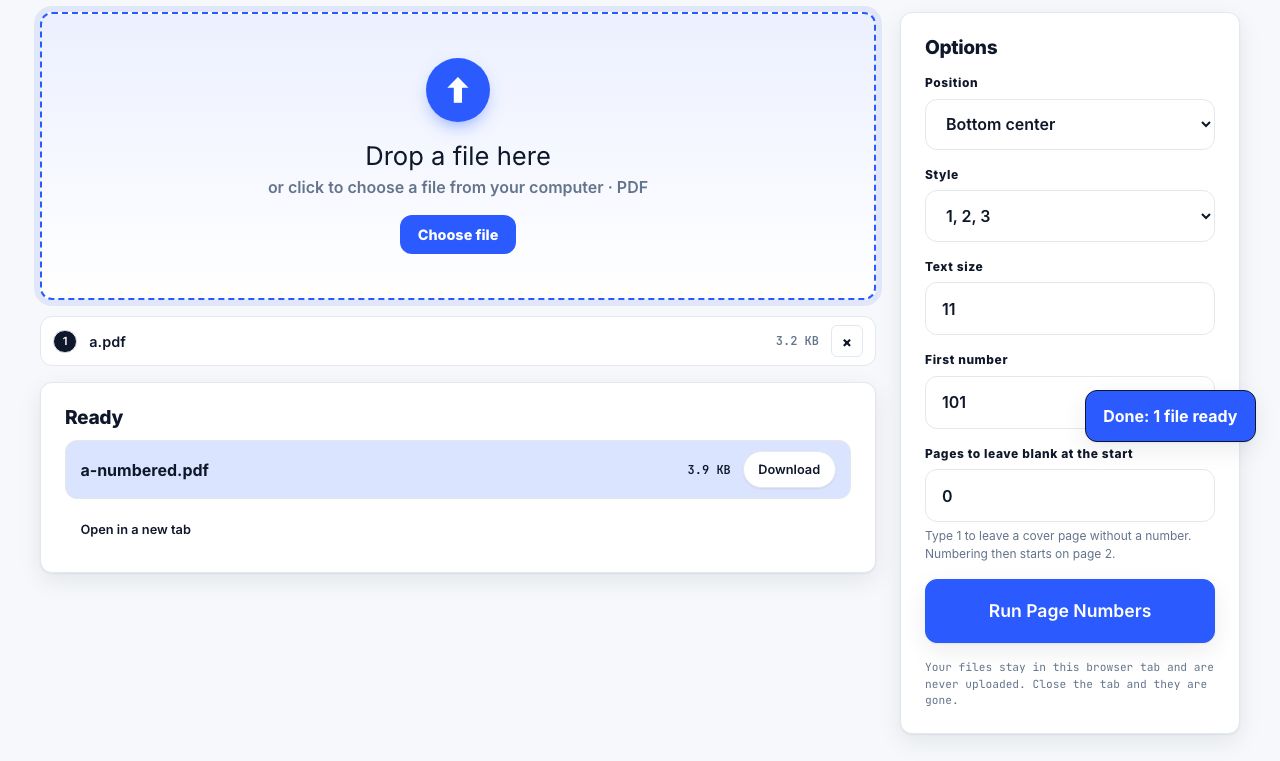
Add a header, footer and page numbers to every page in one pass.
Page Numbers →Avoiding overlap with the content
Header and footer text is drawn on top of whatever is already on the page. Nothing reflows to make room. If the source document has no spare margin, your new header will sit across the first line of text, and it will do it on all 40 pages at once.
Check before you commit. Open the PDF, look at where the text block starts, and measure the gap:
- Most word processor exports leave a 1 inch (72 point) margin top and bottom. That is plenty, put the header at 36 points and it lands in clean space.
- Slides exported to PDF and marketing documents often run content to within 20 points of the edge. There is no safe band; scale the pages down before adding anything.
- Scanned pages vary sheet to sheet, because the scan itself is not perfectly aligned. Use the tightest page as your reference, not the first one.
- Documents that already have a footer need your text in a different horizontal slot, not a different vertical one.
When there is genuinely no room, scale the page content to 94-96 percent before adding the header. This shrinks the printed area slightly and opens a clear band at both edges. At 96 percent, 11pt text becomes about 10.6pt, which nobody detects by eye.
Dates: pick a format and freeze it
A date in a footer is a static piece of text, printed once when you apply it. It does not update when the file is reopened, which is exactly what you want on a document of record.
- Use ISO 8601,
2026-03-09, for anything that will be sorted, filed or read internationally. It removes the 03/09 ambiguity between March and September entirely. - Use a written month,
9 March 2026, for documents going to clients or the public, where readability matters more than sortability. - Label what the date means when it is not obvious:
Issued 2026-03-09orValid until 2026-06-30. - Never put a generated timestamp on a document you will reissue. Two copies with different times in the footer look like two different documents.
File references that pay for themselves
The most useful thing in a footer is usually not the date but the reference: a short code that ties the printed sheet back to the file it came from. A pattern like OPS-2026-11 v3 tells you the owning team, the year, the sequence and the revision. When someone waves a page at you in a meeting, you can find the source in seconds.
Pair the reference with a version marker and a DRAFT watermark while the document is still moving, and drop the watermark for the final issue while keeping the reference. That way the printed archive shows which copies were provisional.
What a header cannot do
| Goal | Header or footer? | Better option |
|---|---|---|
| Identify the document on a loose printed sheet | Yes, this is the core use | , |
| Mark a document as confidential | Partly, it is easy to miss | Add a watermark as well |
| Prevent forwarding or copying | No | Encryption, and accept its real limits |
| Record who authored the file | Yes, visibly | Also check the hidden document metadata |
| Hide something already on the page | No, never | Proper redaction |
Text added as a header is real, selectable, searchable text. That is useful: search a folder for a file reference and every printed-to-PDF copy comes back. It also means the header contents are extracted along with your document text, so do not put anything in a header you would not want in a text dump of the file.
Finish by adding page numbers in the same pass, and check the result at 100 percent zoom rather than fit-to-window, small text is where zoom lies to you.
Frequently asked questions
How do I add a company name to every page of a PDF?
Put it in the header right field of a header and footer tool, set the font to 9pt, apply to all pages, and download. It is drawn onto each page as real text, so it prints and searches like any other text in the file.
Why does my new header cover the existing text?
Header text is drawn over the page rather than pushing content down. The source document has no spare top margin. Either increase the margin so the header sits closer to the edge, or scale the page content to about 95 percent to open a clear band first.
Does the date in a PDF footer update automatically?
No. The date is written once as static text when you apply the footer, which is the right behaviour for a document of record. If you reissue the document, reapply the footer with the new date.
Can I add a header to only some pages?
Yes. Enter a page range before applying. Skipping the cover page is the most common case, since a header repeating the title under a large title block looks like an error.
What font size should a PDF header be?
Between 8 and 10 points, with 9pt as a reliable default. It stays legible on paper while remaining clearly subordinate to 11 or 12 point body text, which is what a reference line should be.