PDF to PNG Converter
Convert every page of a PDF into a PNG image for screenshots, documents, slides, or transparent graphics. Choose the resolution and download the pages in your browser.
Convert every page of a PDF into a PNG image for screenshots, documents, slides, or transparent graphics. Choose the resolution and download the pages in your browser.
What is PDF to PNG Converter?
What is a PDF?
A PDF is a file made of pages that look the same in every app and on every printer. Each page keeps its text, shapes, pictures and fonts at fixed positions. Because the layout is fixed, a page can be turned into a picture at any sharpness you like, which is exactly what a PDF to JPG converter does.
What is a JPG?
JPG (also written JPEG) is the most common photo format. It keeps files small by quietly dropping fine detail the eye rarely notices. That makes it easy to share anywhere, but it can leave a faint blur around sharp text and thin lines. This tool saves JPG at quality 90 out of 100, a good balance between size and clarity for page pictures.
What is a PNG?
PNG is a picture format that keeps every dot exactly as it is, so text edges, diagrams and screenshots stay crisp and the picture never gets worse when you save it again. The trade-off is size: a PNG page can be several times larger than the same page as a JPG. Choose PNG when small text must stay readable; choose JPG for pages full of photos or anything you will email.
Why convert PDF to JPG?
- Share a page anywhere a picture is accepted. Chat apps, slides, social posts and web pages take a picture without asking anyone to open a PDF app. A JPG of the page shows up right away, on every device.
- Pick the sharpness for the job. Screen (72 dpi) is small and fast for a preview. Draft print (144 dpi) suits handouts, Good print (216 dpi) suits most flyers, and Full print (300 dpi) is what a print shop expects.
- Save only the pages you need. Type a page range such as
1-3or2, 5and only those pages are made. A 200-page manual does not have to become 200 pictures. - Keep the file on your own computer. The pictures are made inside your browser tab. The PDF is never uploaded, so contracts, statements and drafts stay private, and it works offline once the page has loaded.
How to use PDF to PNG Converter
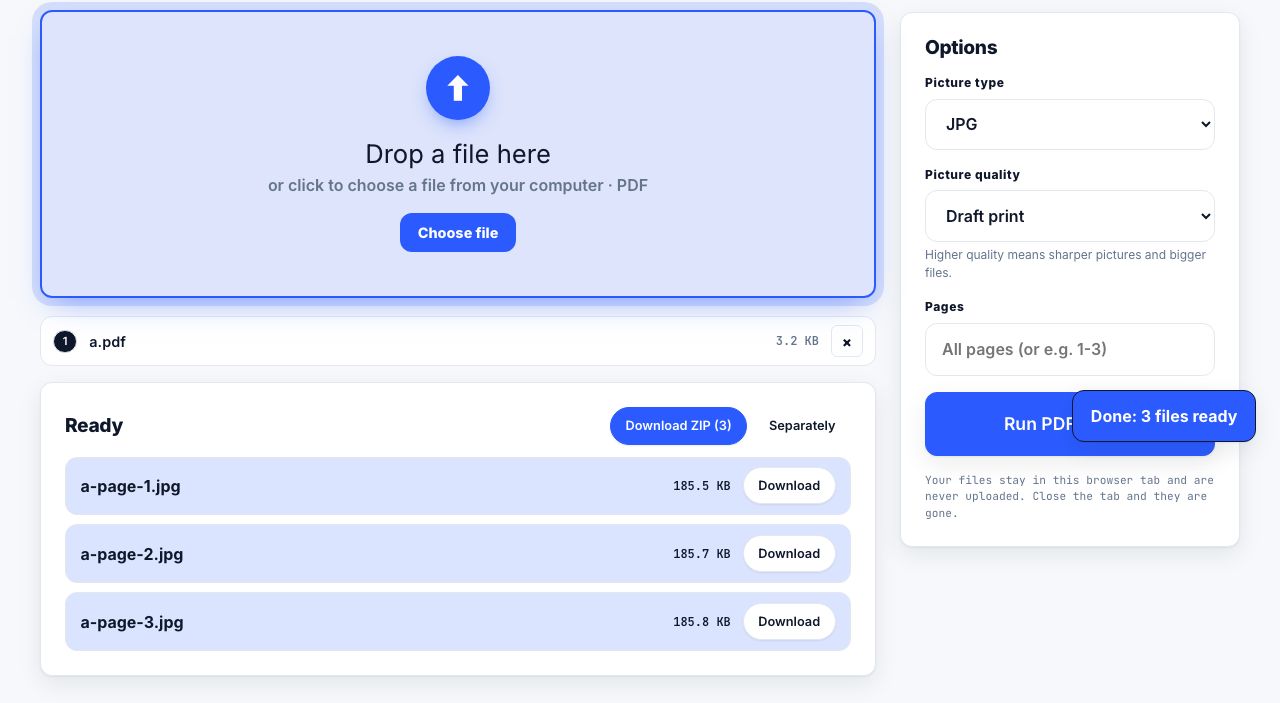
- Open PDF to JPG and drop your PDF Drag the file onto the drop zone, or click it to choose a PDF from your computer. The file is read on your own device.
- Choose JPG or PNG Under Options, set Format to JPG for the smallest files or PNG for the sharpest text.
- Set the sharpness Pick Screen (72 dpi), Draft print (144 dpi), Good print (216 dpi) or Full print (300 dpi). Higher settings take longer and make larger pictures.
- Type a page range, or leave it blank Leave Pages empty to save every page, or enter something like
1-3to make only those pages. - Run PDF to JPG and download Click Run PDF to JPG. A single page downloads straight away. For several pages, choose Download ZIP or Separately in the results list. Each file is named after the PDF and its page number.
Frequently asked questions
Is PDF to JPG free, and does it add a watermark?
Yes, it is free with no sign-up and no watermark. The conversion runs in your browser, so there is no waiting line, no file limit tied to an account, and nothing to delete afterwards.
Which sharpness should I choose for PDF to JPG?
Use 72 dpi for a quick preview or a small thumbnail, 144 dpi for slides and screens, 216 dpi for good-looking prints, and 300 dpi when a printer or publisher asks for print quality. A 300 dpi A4 page is roughly 2480 by 3508 dots.
Does the tool upload my PDF?
No. The pages are drawn and the pictures are built inside your browser tab. Close the tab and nothing remains. This makes the tool safe for contracts, bank statements and unpublished work.
Can I convert just one page of a PDF to JPG?
Yes. Type the page number in the Pages field, for example 4, or a range such as 2-3. Only those pages are made, which is faster and avoids a pile of pictures you do not need.
Why does text look soft in the JPG?
JPG softens sharp edges a little, and 72 dpi is too coarse for small text. Switch Format to PNG for crisp edges, raise the sharpness to 216 or 300 dpi, or do both. PNG files are larger but every dot is kept.
Looking for the long version? The guides cover each of these jobs in depth.
How to take a full-page screenshot of a website
Capture an entire scrolling web page as one image. Chrome DevTools, Firefox and Edge built-in capture, Safari Web Inspector, and when a PDF beats a PNG.
How to compress a PDF file for free
Compress a PDF in your browser with Light, Medium or Strong. Learn which keeps searchable text, which turns pages into images, and how to check the result.
How to compress a PDF without losing quality
Learn what lossless PDF compression preserves, when image-based compression affects text, and how to choose settings for a scan without risking the original.
How to turn a PDF into PowerPoint slides
Convert a PDF into editable PowerPoint slides with PrintxPDF, then check the reconstructed layout. Learn when to use page images as a reliable fallback.