Remove PDF Password
Remove an opening password or usage restriction from a PDF you are authorised to use. Enter the current password when needed, then download the unlocked copy.
Remove an opening password or usage restriction from a PDF you are authorised to use. Enter the current password when needed, then download the unlocked copy.
What is Remove PDF Password?
What is the password to open a PDF?
Some PDFs ask for a password before showing a single page. The contents are scrambled using that password, so without it there is nothing to read. Unlock PDF needs this password: it unscrambles the file with it and saves a copy with no lock, so the PDF stops asking every time you, a colleague or a document system opens it.
What is the password that controls printing and copying?
A PDF can carry a second password that only guards the permission settings: printing, copying text, editing, adding notes and filling forms. A file with this password alone opens normally, but the PDF app greys out Print or Copy. Because the content is not truly secret in that case, the limits can be removed without knowing that password at all. Leave the password field empty and Unlock PDF lifts them.
What kind of locking do PDFs use?
PDF locking has gone through several versions, from old weak scrambling to the strong encryption used today. Our server reads every version. If the correct password is supplied, or none is required, the result is a plain PDF with no lock and the same pages, fonts, pictures, bookmarks and form fields, ready for any tool that refuses locked files.
Why unlock a PDF?
- Stop typing the password every time. A statement, contract or manual you open weekly should not ask for a password on each visit. Save an unlocked copy in a folder you already keep secure.
- Print and copy from a file you own. Publishers and payroll systems often block printing and copying. If you have the right to the document, unlocking restores Print and Copy in every PDF app.
- Feed it to other tools. Merging, splitting, text recognition and archiving tools refuse locked PDFs. Unlock first, then run Merge PDF, OCR PDF or PDF to PDF/A.
- Deleted the moment it is returned. The file goes over a secure connection to our server, is unlocked in a sealed-off space, and the upload is removed as soon as the unlocked copy is sent back. The password stays in memory and is never written down.
How to use Remove PDF Password
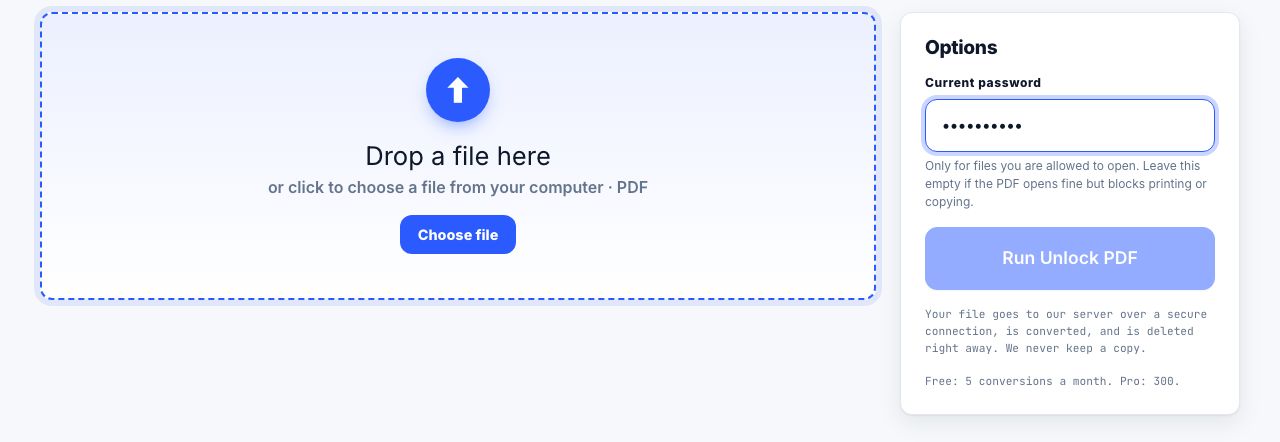
- Open Unlock PDF and drop the locked file Drag the PDF onto the drop zone or click to browse. One file at a time, up to 100 MB.
- Enter the password, or leave it blank If the PDF asks for a password when you open it, type that password. If it opens fine but blocks printing or copying, leave the Password field empty.
- Run Unlock PDF Click Run Unlock PDF. The file is sent over a secure connection to our server, which checks the password, removes the lock and all limits, and returns the result. A wrong password is reported straight away.
- Download the unlocked PDF The copy downloads automatically and the upload is deleted at once. Pages, bookmarks, links and form fields are unchanged; only the lock is gone.
Frequently asked questions
Can you unlock a PDF without the password?
Only when the file has just the printing-and-copying password, meaning it opens without asking but blocks printing or copying. Those limits are removed with the field left blank. If the PDF needs a password to open, that password is needed; strong encryption cannot be bypassed, and we do not try to guess it.
Is it legal to unlock a PDF?
Removing a password from a document you own or are allowed to open, for your own convenience, is normal use. Getting around protection on someone else's document, or to dodge a licence, may break the law where you live. Unlock PDF is for files you have the right to open.
What happens if I enter the wrong password?
The server checks the password before doing anything else and returns a clear error saying it could not open the file. Nothing is converted, nothing is kept, and the attempt does not count against your monthly allowance.
Does unlocking change the content of the PDF?
No. Text, pictures, fonts, bookmarks, links, notes and form fields are copied through unchanged. The only difference is that the lock and the permission settings are gone, so the file opens directly and every PDF app allows printing and copying.
Is my PDF and password stored?
No. The file is uploaded over a secure connection, unlocked in a sealed-off space and deleted the moment the unlocked copy is returned. The password is held in memory only, never written to a log, and thrown away. Free for 5 files a month, Pro 300, API 5,000, see pricing.
Looking for the long version? The guides cover each of these jobs in depth.
How to password protect a PDF, and what it actually protects
User password versus owner password, AES-256 versus legacy schemes, and why print and copy restrictions are advisory. Plus the tools that genuinely encrypt.
How to remove a password from a PDF you own
Remove a PDF open password when you know it and have permission. Learn the difference between opening and owner restrictions, and keep the unlocked file safe.
How to repurpose a PDF for accessible publishing formats
Convert a PDF into spreadsheet, slides or ebook formats, then review structure and accessibility because conversion cannot restore missing source data.