Electronic Signature PDF
Add an electronic signature to a PDF by drawing, typing, or uploading a signature image. Place it where it belongs, add the date, and download the signed copy in your browser.
Add an electronic signature to a PDF by drawing, typing, or uploading a signature image. Place it where it belongs, add the date, and download the signed copy in your browser.
What is Electronic Signature PDF?
What is an electronic signature?
An electronic signature is any mark you make on a screen to show you agree to a document: a drawn scribble, your typed name in a handwriting-style font, or a photo of your pen-and-ink signature. Under the US ESIGN Act and the EU eIDAS rules, a simple electronic signature counts for most everyday agreements. This tool places that mark as a picture on the page of your PDF.
How is it different from a digital signature?
A digital signature is a technical seal rather than a picture. A certificate issued to you, a bit like an online ID card, locks the file, and any later change breaks the seal. It proves who signed and that nothing changed since. This tool does not do that. It gives you a visible signature, which is what most leases, offer letters, consent forms and invoices ask for, but not a certificate or a tamper seal.
Why sign a PDF electronically?
- Sign in a minute, from anywhere. No printer, no scanner, no app. Drop the file, draw with a mouse, finger or stylus, click once to place, and the signed PDF downloads.
- Legally acceptable for most agreements. Simple electronic signatures are recognised under ESIGN, UETA and eIDAS for the vast majority of business and personal documents. If the other side sent a PDF and asked you to sign, this is usually all they need.
- Your document stays private. The PDF and your signature are handled in the browser. Nothing is uploaded, and nothing is kept once you close the tab unless you choose to save a signature.
- Place it exactly where it belongs. Click anywhere on the page to drop the signature, drag it to move, pull the corner to resize, and add as many as you need across pages, plus a date stamp beside it.
- Reuse the same signature. Sign in and click Save signature to keep a drawn or typed version for the next document, so every file carries the same mark.
How to use Electronic Signature PDF
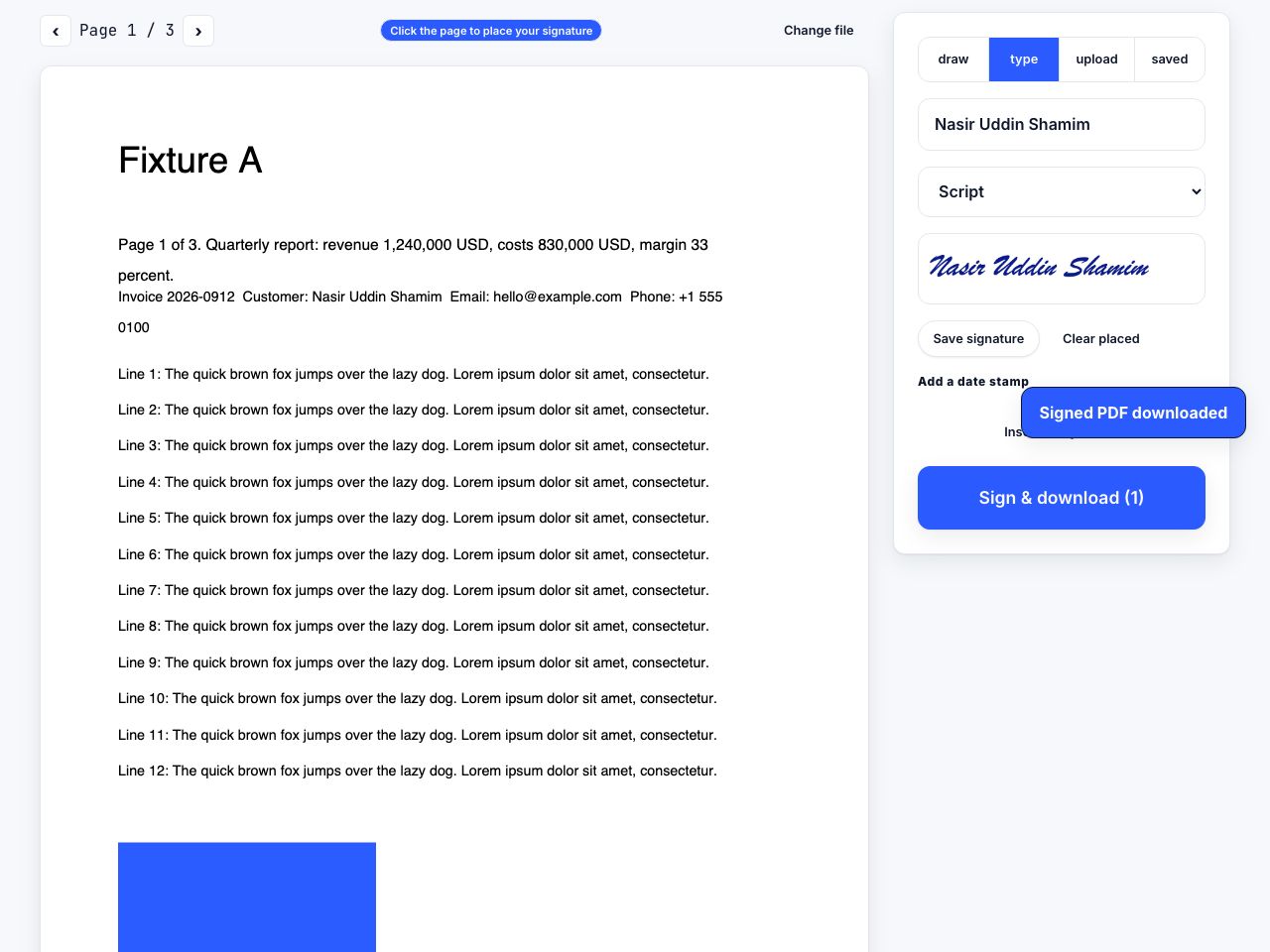
- Open Sign PDF and drop the file Drop the PDF you need to sign. The first page appears; use the arrows above it to reach the page with the signature line.
- Create your signature Pick a tab: draw on the pad (Clear to start over), type your name and choose a handwriting-style font, upload a PNG, JPEG or WebP photo of your handwritten signature, or pick a saved one.
- Click the page to place it Click where the signature should sit. Drag it to adjust, use the corner handle to resize, and the cross to remove it. Repeat on other pages if needed.
- Add a date stamp Click Insert today's date to drop the current date near the bottom right, then drag it next to your signature.
- Click Sign & download The button shows how many items you placed. The signed PDF downloads as
name-signed.pdfwith everything drawn into the pages.
Frequently asked questions
Is a drawn signature legally binding?
Generally yes. ESIGN and UETA in the US and eIDAS in the EU treat a simple electronic signature, drawn or typed, as valid for most contracts, forms and letters. Some documents, such as wills, certain property deeds and court filings, need a witnessed, notarised or certificate-based signature; check the rule for your document.
Does Sign PDF add a digital certificate?
No. It draws your signature as a picture into the page. There is no certificate, no official timestamp and no tamper seal, so a PDF app will not show a "signature valid" panel. For a certificate-based signature you need a signing service and an identity certificate.
Can someone remove my signature afterwards?
The signature is drawn into the page itself, not added as a note on top that can be deleted with a click. Like any plain PDF content it can still be edited by someone determined. If proof of tampering matters, keep your own copy and consider a certificate-based signature.
Can I sign a PDF on my phone?
Yes. The drawing pad responds to touch, so you can sign with a finger or stylus in mobile Safari or Chrome, tap the page to place it and download the result. Typing your name is often quicker on a small screen.
Where are saved signatures stored?
Saved signatures are kept in your browser's storage on the device you are using, tied to your signed-in account. They are not uploaded to a server. Clearing site data or switching browsers removes them.
Looking for the long version? The guides cover each of these jobs in depth.
How to convert Word to PDF and keep the fonts
Export a Word document to PDF with fonts embedded, links intact and headings preserved. The Save As options that matter, plus Google Docs and LibreOffice.
How to sign a PDF without printing it
Sign a PDF on screen in under a minute. Draw, type or upload your signature, place it on the line, add the date, then flatten the file so it cannot be moved.
Are electronic signatures legally binding?
What the ESIGN Act, UETA and eIDAS actually say about electronic signatures, which documents are excluded, and what makes a signature hold up if challenged.
How to create a clean signature image with a transparent background
Turn a signature on paper into a clean transparent PNG. Pen and paper setup, phone photo tips, contrast and threshold settings, and the pixel size to aim for.