PDF to Excel
Turn the tables in a PDF into an Excel file. It runs in your browser: each page becomes a sheet of text lines, so boxes drawn with ruled lines are not read as cells.
PDF to Excel turns the text of a PDF into an Excel file (.xlsx) in your browser. Each page becomes a sheet, each line a row, and wide gaps split a line into cells. It works from the spacing between words, so table lines are not detected. Nothing is uploaded.
What are PDF and XLSX?
What is a PDF?
A PDF stores a page as text, lines and pictures placed at fixed spots. A table in a PDF is just words and drawn lines that happen to line up; the file does not say which word belongs to which cell. That is why pulling a table out of a PDF is guesswork for every converter, and why this tool tells you plainly that it works from the gaps between words.
What is an XLSX file?
XLSX is the file type Microsoft Excel uses for a workbook. It opens in Excel, Google Sheets, Numbers and other spreadsheet apps. Once the text from your PDF is in cells, you can sort it, filter it, add up a column and make a chart, none of which you can do inside a PDF.
Why convert PDF to Excel?
- Get the numbers into cells. Bank statements, price lists and reports arrive as PDF. In a spreadsheet you can total a column, sort by date or filter by supplier in seconds.
- Stop retyping. Even a rough grid saves the slow job of copying figures by hand. Fix the odd misplaced cell instead of typing every one.
- One sheet per page. Each PDF page lands on its own sheet named
Page 1,Page 2and so on, so a long statement stays easy to move around. - Nothing leaves your computer. Reading the text and building the workbook both happen in your browser. Money documents are never uploaded, and there is no account to sign up for.
How to convert PDF to Excel, step by step
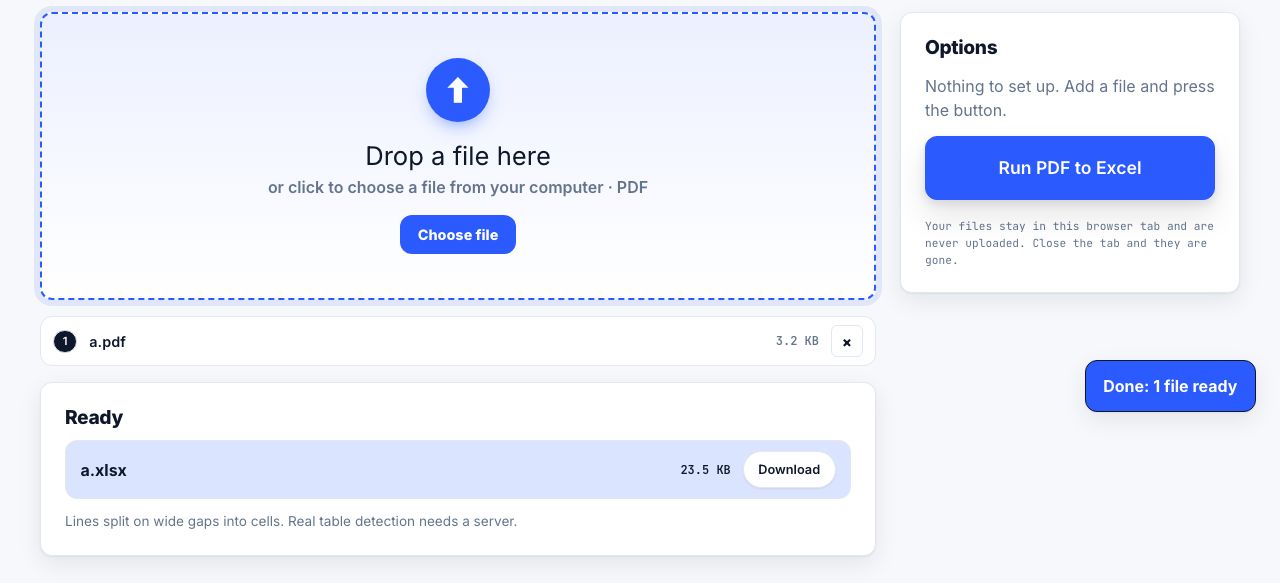
- Open PDF to Excel and drop your PDF Drag the file onto the drop zone or click to choose it. The PDF is read on your own computer.
- Run PDF to Excel There are no options. Click Run PDF to Excel. Each page is read as lines, and each line is split into cells wherever there are two or more spaces or a tab.
- Download the .xlsx The workbook downloads on its own, named after the PDF, with one sheet per page. A note under the result reminds you how the cells were split.
- Clean up in Excel Values arrive as text. Select the columns and use Text to Columns or Convert to Number so Excel treats figures as numbers. Delete header and footer rows you do not need.
Frequently asked questions
Will PDF to Excel detect my tables properly?
Not always. The tool cannot see the drawn lines of a table; it splits each line of text where there is a gap of two or more spaces or a tab. Tables with plenty of space between columns come out well. Tightly packed tables, wrapped cells and merged headers need tidying by hand.
Why are my numbers stored as text?
Every cell is written as text, so Excel shows a small warning triangle and will not add them up yet. Select the column and choose Convert to Number, or use Text to Columns with the default settings, and Excel reads the values as numbers.
Why is the workbook empty?
The PDF has no real text in it, only a picture of the page, which means it was scanned or saved as images. Run OCR PDF first. OCR turns a picture of text into real text you can search and copy. Then convert that copy. Handwriting and blurry scans will still need checking.
Can I convert only one page?
The whole document is converted, but every page gets its own sheet, so just delete the sheets you do not need. Or run Extract Pages first and convert the shorter PDF.
Is my PDF uploaded?
No. The text is read and the .xlsx is built inside your browser tab. Statements, invoices and payroll never reach our servers, and nothing is kept after you close the page.
Looking for the long version? The guides cover each of these jobs in depth.
How to convert a PDF table into Excel
Get a table out of a PDF into Excel: Power Query From PDF, copy-paste with Text to Columns, text extraction, and how to spot numbers that came in wrong.
How to repurpose a PDF for accessible publishing formats
Convert a PDF into spreadsheet, slides or ebook formats, then review structure and accessibility because conversion cannot restore missing source data.