EPUB to MOBI Converter
Convert an EPUB ebook to MOBI for older Kindle software and readers. Choose MOBI in the ebook converter, upload the book securely, and download the result when it is ready.
Convert an EPUB ebook to MOBI for older Kindle software and readers. Choose MOBI in the ebook converter, upload the book securely, and download the result when it is ready.
What is EPUB to MOBI Converter?
What is EPUB?
EPUB is the most common open ebook format, the one most reading apps and devices understand. An .epub file holds the chapters, pictures and typefaces of a book, plus a list that sets the reading order and the table of contents. Its text reflows, meaning it re-wraps to fit whatever screen and text size you choose. Apple Books, Kobo, Google Play Books and current Kindles (by sending the file to them) all read it.
What is MOBI or AZW3?
MOBI is the old Kindle format from the earliest Kindle devices. It handles only simple formatting and cannot carry its own typefaces. AZW3 is Amazon's newer Kindle format, with proper styling, built-in typefaces and tables. Kindle devices and apps open both when you copy the file across yourself. MOBI is only the safer choice for Kindles made before 2011. Apple Books and Kobo cannot open either, which is why people convert.
What is FB2?
FB2 (FictionBook 2) is an ebook format popular in Russia and Eastern Europe. Instead of describing how the text should look, one .fb2 file describes what each part is: a paragraph, a poem, a quote, a note, with pictures tucked inside. Reading apps such as FBReader and Cool Reader, and PocketBook devices, open it directly, and it converts to and from EPUB without losing the structure.
What is a TXT ebook?
A .txt file is plain text with no formatting, pictures or table of contents: only the words, line breaks and paragraph gaps. It is the most portable format of all, opening on every device ever made, and it is the right choice when you want to search a book, feed it to a screen reader or edit it. Converting to TXT drops the cover, typefaces and layout on purpose.
Why convert between ebook formats?
- Open a book on the device you actually own. Kindles want AZW3 or MOBI; Apple Books, Kobo and most Android readers want EPUB. Converting turns a file that will not open into one that does, cover and chapters intact.
- Move your library to a new reader. Switching from Kindle to Kobo, or the other way, does not have to mean losing the books you own without copy protection. Run them through the converter one at a time and carry on reading.
- Upgrade old MOBI files to AZW3. AZW3 supports built-in typefaces, real tables and better-looking text. Converting an old MOBI to AZW3 lets a modern Kindle show it properly.
- Get plain text for search, editing or accessibility. TXT output strips everything but the words, which is ideal for searching, quoting, screen readers and read-aloud tools.
- Deleted the moment it is done. The book travels over a secure connection to our converter, is changed into the new format, and the upload is removed as soon as the result is sent back.
How to use EPUB to MOBI Converter
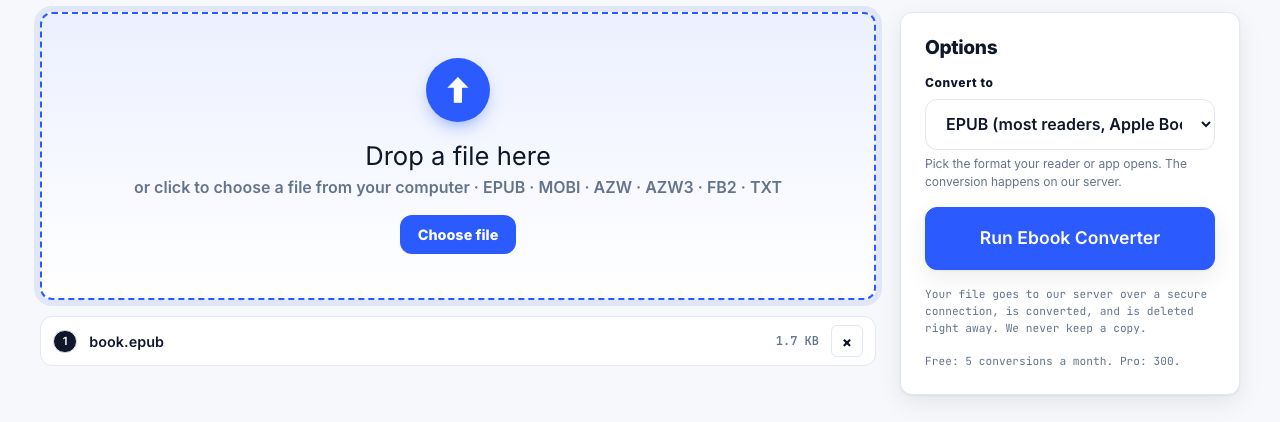
- Open Ebook Converter and drop your book Drag an .epub, .mobi, .azw, .azw3, .fb2 or .txt file onto the drop zone. One book at a time, up to 100 MB.
- Pick the format you want in Convert to Choose EPUB for Apple Books, Kobo and most readers, AZW3 for Kindle, MOBI for older Kindles, FB2 for FBReader and PocketBook, or Plain text.
- Run Ebook Converter Click Run Ebook Converter. The file is sent over a secure connection to our converter and rebuilt in the new format. There are no page settings here: the reading device decides the page.
- Download and copy it to your reader The converted book downloads automatically and the upload is deleted at once. Copy it over by cable, email it to your Kindle address or open it in your reading app.
Frequently asked questions
Can I convert a copy-protected ebook?
No. Books bought from a store with copy protection (often called DRM) are locked to your account, and the converter cannot open them: it spots the lock and returns an error instead of a file. Books without copy protection, including most from independent publishers and self-published authors, convert normally.
Will the cover, table of contents and pictures be kept?
Yes, wherever the new format can hold them. EPUB, AZW3, MOBI and FB2 keep the cover, chapter structure and pictures. TXT keeps only the text, by design.
Which format should I choose for a Kindle?
AZW3. It is the format modern Kindles and Kindle apps use for books you copy across yourself, with built-in typefaces and full styling. Choose MOBI only for a Kindle made before 2011. Current Kindles also accept EPUB through Send to Kindle.
Is the converted book identical to the original?
The text, order and pictures are the same. Layout may differ, because each format supports different styling: MOBI drops built-in typefaces and some styling, FB2 keeps structure rather than looks, and TXT keeps words only. EPUB to AZW3 and back loses almost nothing.
What are the limits and is the file kept?
Files up to 100 MB, 2 minutes per conversion. The upload is deleted the moment the result is returned. The free plan includes 5 server conversions a month, Pro 300 and the API plan 5,000, see pricing.
Looking for the long version? The guides cover each of these jobs in depth.
MOBI to EPUB Converter
Convert MOBI ebooks to EPUB for Apple Books, Kobo, and other readers. Secure server conversion deletes the source after the result is returned.
AZW3 to EPUB Converter
Convert AZW3 ebooks to EPUB for compatible readers. Upload securely, choose EPUB, and download the converted book after the server job finishes.
EPUB to AZW3 Converter
Convert EPUB ebooks to AZW3 for Kindle devices. Choose AZW3 in the secure ebook converter and download the result after conversion.
FB2 to EPUB Converter
Convert FB2 ebooks to EPUB for phones, tablets, Kobo, and Apple Books. Secure conversion returns the EPUB and deletes the source.
How to make a PDF from Word, Excel, PowerPoint or an ebook
Choose the right conversion route for a Word file, spreadsheet, slide deck or ebook, then check fonts, page breaks, worksheets and reading order.
How to repurpose a PDF for accessible publishing formats
Convert a PDF into spreadsheet, slides or ebook formats, then review structure and accessibility because conversion cannot restore missing source data.
How to convert AZW3 to EPUB without losing the book
Convert a DRM-free AZW3 Kindle ebook to EPUB for other readers. Check copy protection first, choose the right output, then verify chapters and images.
How to convert an EPUB to PDF, and what you give up
Turn an EPUB into a PDF you can print or annotate. Pick the page size, margins and text size first, because an EPUB has no pages until you choose them.