PDF to PDF/A
Convert to PDF/A, the long-term format that archives, courts and government offices ask for, with fonts built in so it still looks right decades from now. The file is sent to our server over a secure connection, converted and deleted right away.
PDF to PDF/A turns an ordinary PDF into PDF/A, a long-term archive version of PDF that courts and archives ask for. Fonts are packed inside and the file is marked as PDF/A-1b, 2b or 3b. Our converter rebuilds each page, so check the result. Free for 5 files a month.
What are PDF and PDF/A?
What is a PDF?
A PDF is the fixed-layout file everyone reads. An everyday PDF may borrow fonts from the computer that made it instead of carrying them inside, and may contain passwords, scripts or links to things outside the file. All of that is fine for a file you open today, and a problem for a file that must still open correctly in 2050.
What is PDF/A?
PDF/A is a long-term archive version of PDF. It bans anything that depends on the outside world: every font must be packed inside, colours must be fully described, and passwords, scripts and outside links are not allowed. PDF/A-1 is the strictest and oldest, PDF/A-2 allows more modern features such as see-through layers, and PDF/A-3 lets the file carry attachments. The letter b means the pages will always look the same.
Why convert PDF to PDF/A?
- Meet a requirement. Courts, online filing sites, public archives, universities and many tenders ask for PDF/A by name. A proper PDF/A file is accepted; a plain PDF is sent back.
- Still readable decades from now. With fonts and colour details inside the file, nothing depends on software or fonts that may not exist later. That is the whole point of the format.
- Pick the version the recipient wants. PDF/A-1b works with the oldest checkers, 2b is the sensible default for almost every archive, and 3b is needed when the PDF must carry an attachment such as an electronic invoice.
- No software to install. Desktop tools that write PDF/A are expensive or awkward. Here you drop the file, choose the version, and our converter does the work.
How to convert PDF to PDF/A, step by step
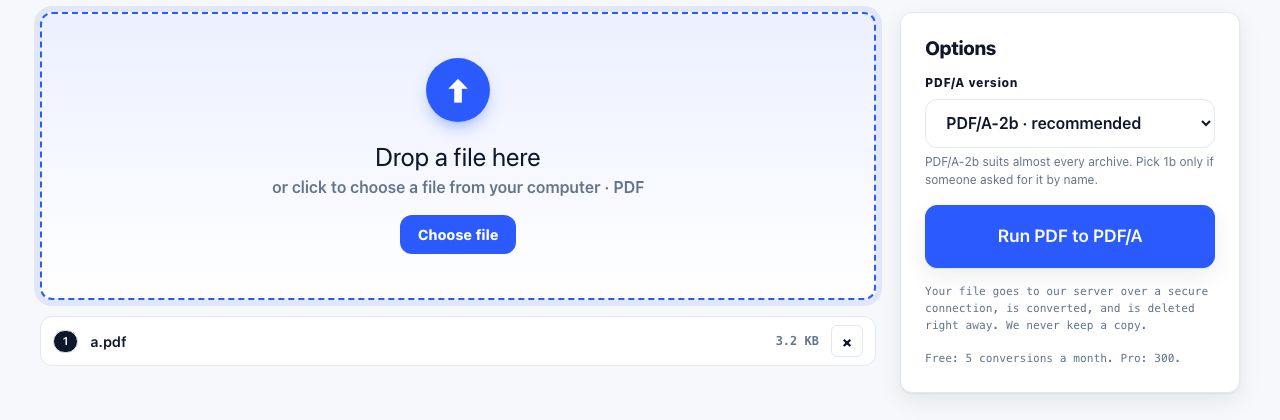
- Open PDF to PDF/A and drop your PDF Drag the file onto the drop zone or click to choose it. Password-protected files are refused; remove the password with Unlock PDF first.
- Choose the version Under Options, set Conformance to PDF/A-2b unless you were asked for something else. Pick 1b only when a site demands it by name, and 3b when the file must carry attachments.
- Run PDF to PDF/A Click Run PDF to PDF/A. The file is sent over a secure connection, converted on our server, and sent back. The progress bar shows the upload and the conversion.
- Download and check the pages The PDF/A downloads on its own. Open it and compare a few pages with the original: our converter rebuilds each page, so check that nothing has moved before you file it.
Frequently asked questions
Will the PDF/A look exactly like my original?
Usually close, not always identical. Our converter opens the PDF and saves it again, so simple text documents come through cleanly, while files with unusual fonts, complex drawings, forms or see-through effects can show small shifts in spacing or layout. Always check the result before submitting it.
Is the output checked as valid PDF/A?
The file is marked with its version and carries its fonts and colour details, but we do not run a separate checker on it. If your archive or court requires a checking report, run the file through a PDF/A checking tool before you submit it.
Which version should I choose: 1b, 2b or 3b?
Choose 2b unless told otherwise; it is the modern default and accepts more kinds of content than 1b. Choose 1b only when a site asks for PDF/A-1 by name. Choose 3b when the PDF must carry an attachment, for example an electronic invoice inside a PDF.
Is my file stored on the server?
No. It is sent over a secure connection, converted, sent back and deleted the moment the job finishes; nothing is logged or kept. The free plan allows 5 server conversions a month with no sign-up, files up to 100 MB. Pro raises that to 300.
Why is a password-protected PDF rejected?
PDF/A does not allow passwords, and a locked file cannot be read for conversion anyway. Run it through Unlock PDF with the password you were given, then convert the unlocked copy.
Looking for the long version? The guides cover each of these jobs in depth.
What is PDF/A, and when do you actually need it?
PDF/A is the archival version of PDF: fonts embedded, no scripts, no encryption, no outside references. Who requires it, and why an ordinary PDF can rot.
How to scan paper to PDF with a phone and get a clean result
Turn phone photos of paper into a straight, evenly lit, readable PDF. Capture mistakes that ruin a scan, how to fix each one, and how to make it searchable.
Will this file still open in twenty years?
Compare PDF/A, plain PDF, Markdown, plain text, DOCX and app-only formats for long-term survival, and see which documents to convert before it is too late.
How to prepare a PDF for long-term archiving
PDF archive checklist: repair files, preserve searchable text, remove metadata if needed, and convert to PDF/A when your records policy requires it.