Delete Pages
Remove the pages you do not want from a PDF. Type the page numbers and download the rest.
Delete Pages removes the pages you list, such as 2, 5-7, from a PDF and gives you a new file with the rest in their original order. The pages you keep are copied exactly as they are, so nothing loses quality. Free, in your browser: no upload, no sign-up.
What does deleting PDF pages do?
How pages are removed
The tool builds a new PDF and copies into it every page you did not list, in the same order they had. The removed pages, along with any pictures that belonged only to them, are left out completely, so the file usually gets smaller. Things shared with the surviving pages, such as a typeface, stay because those pages still need them. Your original file is not changed.
Page position versus the number printed on the page
The numbers you type are positions counting from the first sheet as 1, not the number printed at the bottom of the page. A report with an unnumbered cover and a contents page has its printed page 1 in third position, so deleting it means typing 3. Check the position in PDF Reader, or use Organize Pages to delete by clicking a page preview instead.
Why delete PDF pages in the browser?
- Drop blank pages from a scan. Two-sided scanners add an empty back for every single-sided sheet. Listing them once removes them all and the file gets smaller.
- Remove what should not be shared. Take out the internal cover note or the pricing appendix before a PDF goes to a client, without exporting the whole document again.
- Nothing loses quality. The surviving pages are copied with their typefaces and pictures intact. Text stays searchable and scans stay sharp.
- Private and free. The file is read and rebuilt inside the tab. No upload, no account and no copy on a server that has to be deleted later.
How to delete pages from a PDF, step by step
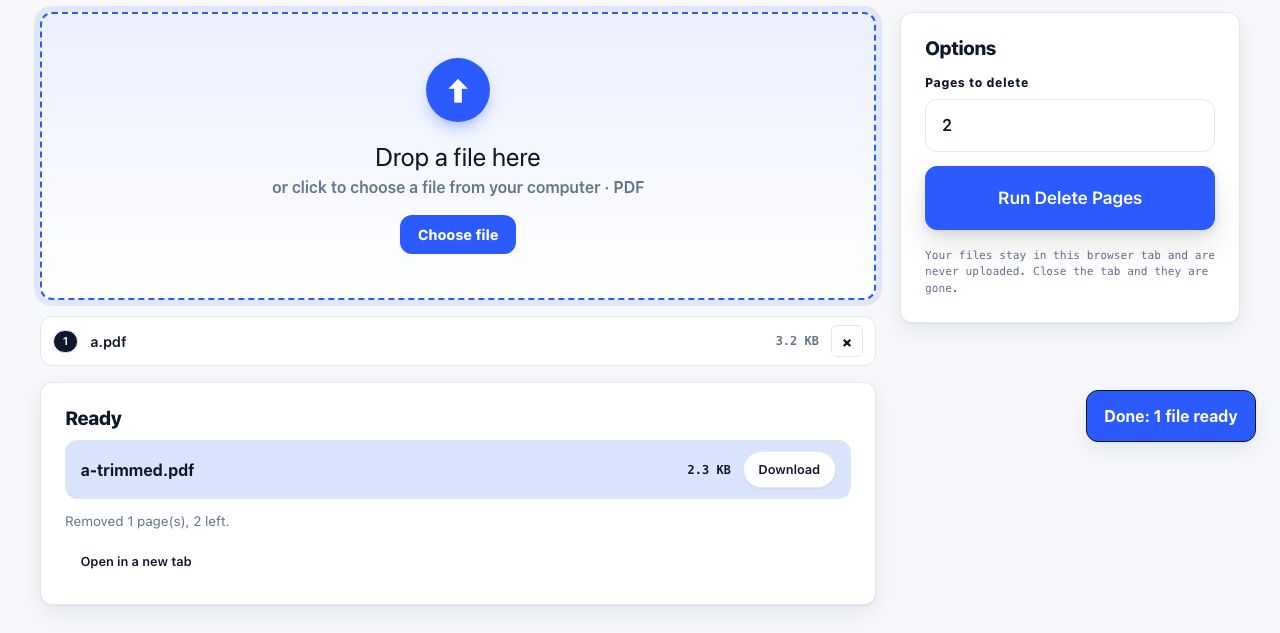
- Open Delete Pages and drop your PDF. Drag one file onto the drop zone or click to browse. The Pages to delete field appears on the right.
- Type the pages to delete. Enter single pages and ranges separated by commas, for example
2, 5-7.10-means page ten to the end. Numbers count from the first sheet. - Click Run Delete Pages. The kept pages are copied into a new document in your browser. You cannot delete every page; if the list covers the whole file you get a message instead of an empty PDF.
- Download the trimmed file. The result downloads as
name-trimmed.pdfand the Ready list notes how many pages were removed and how many remain. Prefer to see the pages first? Organize Pages deletes by page preview.
Frequently asked questions
Can I delete pages from a PDF without installing software?
Yes. This runs entirely in your browser, so there is nothing to install and the file is never uploaded. It works in current versions of Chrome, Firefox, Safari and Edge on desktop and on phones.
Will deleting pages make the file smaller?
Usually. Pictures and drawings that belonged only to the removed pages are not copied, so a scan loses a matching share of its size. Typefaces shared with the remaining pages stay. If the result is still large, run it through Compress PDF.
Is the deleted content really gone from the file?
Yes. The new PDF is put together only from the pages you kept, so the removed pages are not present in any form. This is different from hiding a paragraph on a page you keep; for that, Redact PDF blacks out and permanently removes the words themselves.
What if I delete the wrong page?
Nothing is lost. The tool writes a new file and leaves your original untouched, so drop the original again with a corrected list. If you are unsure of the numbers, Organize Pages shows a preview of each page with a delete button under it.
Can I delete pages from a password-protected PDF?
Only after removing the password. A locked file can be opened for its outline, but its page content stays locked and the copied pages may come out blank. Use Unlock PDF first, then delete the pages you do not need.
Looking for the long version? The guides cover each of these jobs in depth.
Why a web page prints cut off and how to fix it
Fix web pages that print with clipped text, blank pages or missing sections. Check scale, margins, page breaks, background images and print styles.
How to reorder, rotate and delete PDF pages
Fix a PDF whose pages are out of order, sideways or unwanted. Drag thumbnails to reorder, rotate in 90 degree steps, remove pages and save the result.
How to combine PDF files in a custom page order
Build one PDF packet from several files, rearrange pages, remove extras and check the final order before you share or print it.
How to delete pages from a PDF
Remove blank pages, cover sheets, ad pages or a whole appendix from a PDF. Delete by thumbnail or page range in your browser, then download the clean file.