Password Protect PDF
Password protect a PDF with strong encryption and optional print or copy restrictions. The protected file is returned over HTTPS, and the uploaded source is deleted after conversion.
Password protect a PDF with strong encryption and optional print or copy restrictions. The protected file is returned over HTTPS, and the uploaded source is deleted after conversion.
What is Password Protect PDF?
What is a password-protected PDF?
A protected PDF has its pages, pictures and hidden details scrambled inside the file, and only the right password unscrambles them. A PDF can carry two passwords: the password to open it, and the password that controls printing and copying. Protect PDF sets both to the password you enter, so the file asks for it when opened and the limits cannot be lifted without it.
What is strong encryption in a PDF?
Encryption means scrambling the file so it cannot be read without the key. Older PDFs used weak scrambling that has long since been cracked. Protect PDF always uses the newest and strongest method the PDF format offers, known as AES-256, which makes guessing a decent password impractical. Every current PDF app, from Adobe Acrobat to Preview, Chrome and Edge, opens it.
What are PDF permissions?
Alongside the password, a PDF carries settings that tell a PDF app whether printing, copying text, editing, form filling and adding notes are allowed once the file is open. Well-behaved apps respect them. Protect PDF lets you allow everything, block printing, block copying, or block both. Reading aloud for people who use screen readers is always left on, so the document stays usable by everyone allowed to open it.
Why password protect a PDF?
- Send private documents with confidence. Contracts, payslips, medical letters and bank statements travel through mail servers and shared inboxes. With strong encryption the file is unreadable to anyone without the password, wherever it ends up.
- Meet a policy or a client requirement. Many firms require personal data to be locked while it is sent and stored. A protected PDF meets that even when the document goes as an ordinary attachment.
- Limit printing and copying. Share a draft, a price list or a manuscript for reading only. Blocking print and copy makes casual passing-on harder without stopping the other person from reading.
- Real locking, not a viewer trick. The protection is written into the file itself, so it holds in every PDF app and does not depend on our site.
- Deleted the moment it is returned. Browsers cannot write PDF encryption, so the file goes over a secure connection to our server, is locked in a sealed-off space, and is removed as soon as the result is sent back. The password is used in memory and never written down.
How to use Password Protect PDF
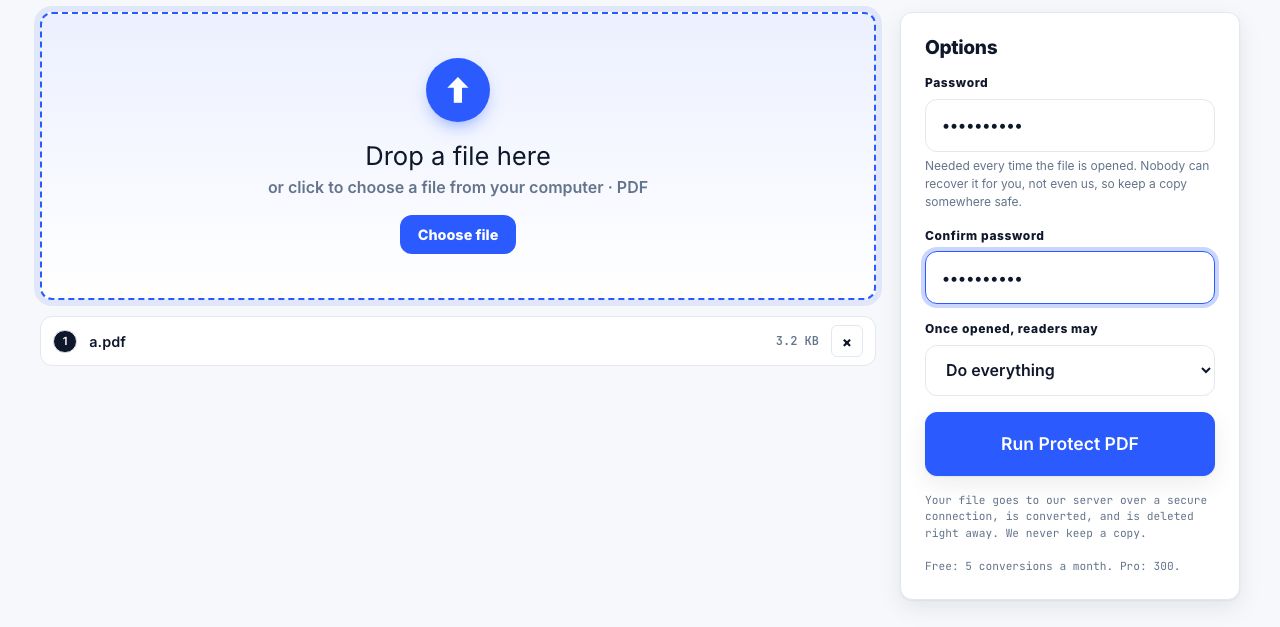
- Open Protect PDF and drop your PDF Drag the file onto the drop zone or click to browse. One file at a time, up to 100 MB. A PDF that is already locked is refused rather than locked twice; unlock it first.
- Type the password twice Enter a Password of at least 4 characters and repeat it in Confirm password. Longer is stronger: a phrase of four or five words is far harder to guess than eight random characters. Keep a copy; nobody can recover it.
- Choose what stays allowed once open Under Once open, allow, pick Everything, No printing, No copying text or No printing or copying.
- Run Protect PDF Click Run Protect PDF. The file is sent over a secure connection to our server, locked with strong encryption, and the protected PDF downloads on its own. The upload is deleted at once.
- Share the password separately Send the password by a different route from the file, for example by phone or a text message rather than the same email. That is what makes the lock count.
Frequently asked questions
How secure is the password protection?
The file is locked with AES-256, the strongest encryption in the PDF standard, and there is no back door. The weak point is the password: a short or common one can be guessed by automated tools, while a long phrase cannot be cracked in any practical time.
What if I forget the password?
The document cannot be opened, by you or by us. We do not store passwords or files, and strong encryption has no recovery route. Keep the password in a password manager, and keep an unprotected copy somewhere safe.
Will the protected PDF open in Acrobat, Preview and browsers?
Yes. This kind of encryption has been part of the PDF standard for years and is supported by Adobe Acrobat and Reader, Preview on a Mac, Chrome, Edge, Firefox, Safari and every mainstream PDF app released in the last decade. Each will ask for the password on opening.
Can someone get around the "no printing" or "no copying" limit?
The limits are enforced by the PDF app, so a determined person who knows the password to open the file could use a tool that ignores them. They stop casual copying and printing, not a motivated attacker. The password to open the file is the real protection; the limits are a polite request that mainstream apps respect.
Is my document uploaded, and is the password stored?
The PDF is uploaded over a secure connection, because browsers cannot write PDF encryption, and it is deleted the moment the protected copy is returned. The password is held in memory only, never written to a log, and thrown away. Free for 5 files a month, Pro 300, API 5,000.
Looking for the long version? The guides cover each of these jobs in depth.
How to password protect a PDF, and what it actually protects
User password versus owner password, AES-256 versus legacy schemes, and why print and copy restrictions are advisory. Plus the tools that genuinely encrypt.
How to remove a password from a PDF you own
Remove a PDF open password when you know it and have permission. Learn the difference between opening and owner restrictions, and keep the unlocked file safe.
How to prepare a PDF for long-term archiving
PDF archive checklist: repair files, preserve searchable text, remove metadata if needed, and convert to PDF/A when your records policy requires it.