PDF to DOCX Converter
Convert a text-based PDF into a DOCX Word document you can edit. This browser tool prioritises readable text and warns when the original PDF layout, images, or columns cannot be preserved.
Convert a text-based PDF into a DOCX Word document you can edit. This browser tool prioritises readable text and warns when the original PDF layout, images, or columns cannot be preserved.
What is PDF to DOCX Converter?
What is a PDF?
A PDF stores each page as text, pictures and shapes at fixed spots. It records where every letter sits, not how the paragraphs, columns and tables were built, which is why turning a PDF back into an editable document is hard. Text can be read out of a PDF made from Word or a web page; a scanned PDF holds only pictures.
What is a DOCX file?
DOCX is the file type Microsoft Word uses. Unlike a PDF, it describes paragraphs and text rather than fixed positions, so Word, Google Docs and other writing apps lay the text out fresh and let you edit anything. This tool writes a simple .docx with one paragraph per line of the PDF.
Why convert PDF to Word?
- Edit the words without retyping. When the original document is lost and only the PDF survives, a .docx gives you the text back in a form you can revise, reuse and share.
- Work in the tool you know. Comments, tracked changes, spell-check and styles all live in Word and Google Docs. Get the content there and carry on.
- Keep the file private. The text is read and the .docx is built inside your browser. Nothing is uploaded, so legal drafts and personal records stay on your computer.
- Honest about what you get. This pulls out the text; it does not rebuild the layout. You know before you start that pictures, columns and tables will not come across, so there are no surprises.
How to use PDF to DOCX Converter
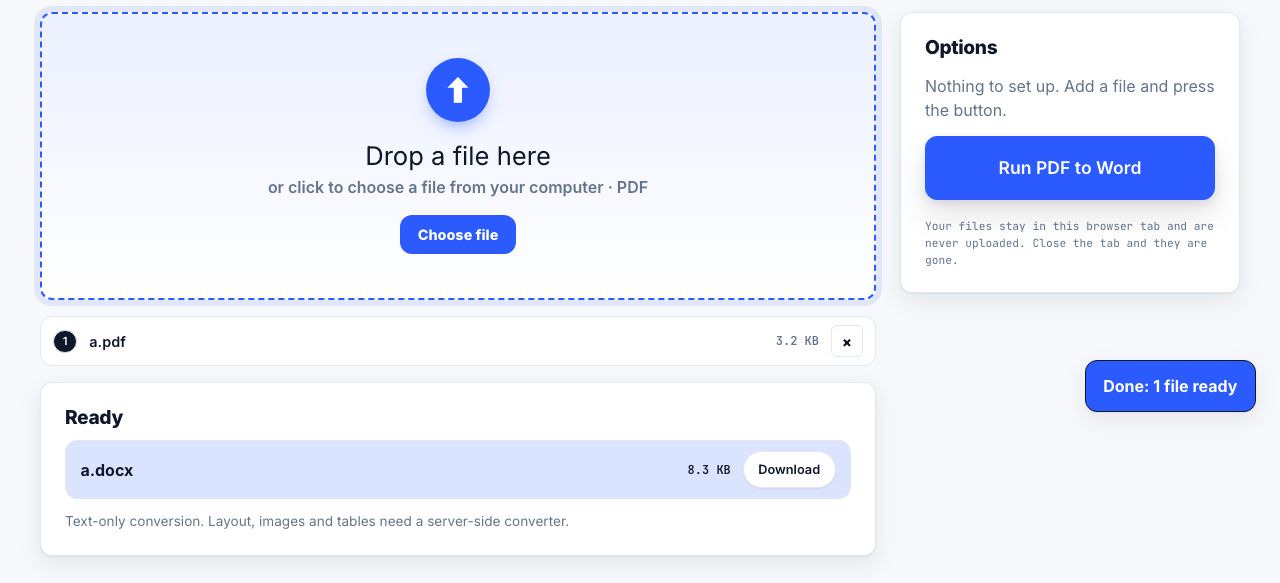
- Open PDF to Word and drop your PDF Drag the file onto the drop zone or click to choose it. The PDF is read on your own computer.
- Run PDF to Word There are no options. Click Run PDF to Word and the progress bar walks through the pages.
- Download the .docx The file downloads on its own, named after the PDF. Each page begins with a bold Page N heading, and every line of text becomes its own paragraph.
- Tidy up in Word Open the file in Word or Google Docs, join lines that belong to the same paragraph, and apply your own styles. For a scanned PDF, run OCR PDF first, then convert the searchable copy.
Frequently asked questions
Will PDF to Word keep my layout?
No. This is a text-only conversion: fonts, columns, tables, pictures, headers and footers are not rebuilt. You get the words in reading order, one paragraph per line, with a heading marking each page. For a faithful layout, you need a desktop program such as Adobe Acrobat or Microsoft Word itself.
Why are there so many short paragraphs?
A PDF stores lines, not paragraphs, so every line of the original becomes its own paragraph in the .docx. In Word, select the text and use Find and Replace to swap paragraph marks (^p) for spaces where lines should join.
Why is the Word file empty?
The PDF has no real text, only a picture of the page, which means it was scanned or saved as images. Run it through OCR PDF first. OCR turns a picture of text into real text you can search and copy. Then convert that copy, or take the text straight from the OCR result.
Does it work with tables?
The words in the cells come across as lines, but the table itself does not. If the numbers matter, try PDF to Excel, which splits each line on wide gaps into separate cells, then copy the cells into Word.
Is my PDF uploaded?
No. Reading the text and building the .docx both happen in your browser tab, and there is no account or file history. Close the tab and nothing remains anywhere.
Looking for the long version? The guides cover each of these jobs in depth.
How to convert a PDF to Word and keep the formatting
Convert a PDF to an editable Word document using Word itself or Google Docs, why the layout breaks, and what to do when the file is a scan with no text layer.
How to tell if a PDF is searchable, and make it so
Three quick tests that tell you whether a PDF contains real text or just pictures of text, what causes each failure, and how to fix an image-only document.
Scan paper to searchable PDF: capture, OCR and verify
Capture paper clearly, create a PDF, add searchable text with OCR and compare recognized words with the original scan before relying on it.