Repair PDF
Rebuild a damaged PDF that will not open or shows errors. We recover as much as we can, sometimes all of it.
Repair PDF reads a damaged PDF in your browser, skips the broken parts, and writes it back with a fresh internal index so it opens again. It is best effort: content that is truly missing cannot be brought back, but a file that refuses to open often can.
What is a corrupted PDF?
How PDFs get damaged
A PDF is a set of numbered pieces followed by an internal index that records where each piece sits in the file, and a short footer that points to the index. Any of those can break: a download cut off before the end, a transfer that changed the file on the way, an editor that crashed mid-save, or a tool that wrote the index wrongly. The content may be fine while the index is wrong, and a strict PDF app then reports that the file is damaged and stops.
What the repair does
Instead of trusting the index, the tool reads the file piece by piece, skipping anything it cannot make sense of rather than giving up, and rebuilds the list of pages from what it finds. It then writes a new file with a correct index and footer, in a plain layout that older PDF apps also handle. Because the pages are written from what could be read, this is best effort: damage inside a page or a picture cannot be invented back.
Why repair a PDF in the browser?
- Open a damaged file again. When a PDF app says the file is damaged, the cause is usually the index, not the pages. Rebuilding the index is often all it takes.
- Rescue a cut-off download. A file cut off part-way often still holds every page that made it. Repair recovers those pages into a file that opens normally.
- Make a strict app happy. Files that open in one app but fail in another usually have a sloppy structure. A clean rewrite fixes the difference.
- Keep a broken contract private. A damaged file is still a private file. The rebuild happens inside the tab and nothing is uploaded.
- Nothing to install, free. No desktop app, no account, no limit. Drop the file, run, download.
How to repair a PDF, step by step
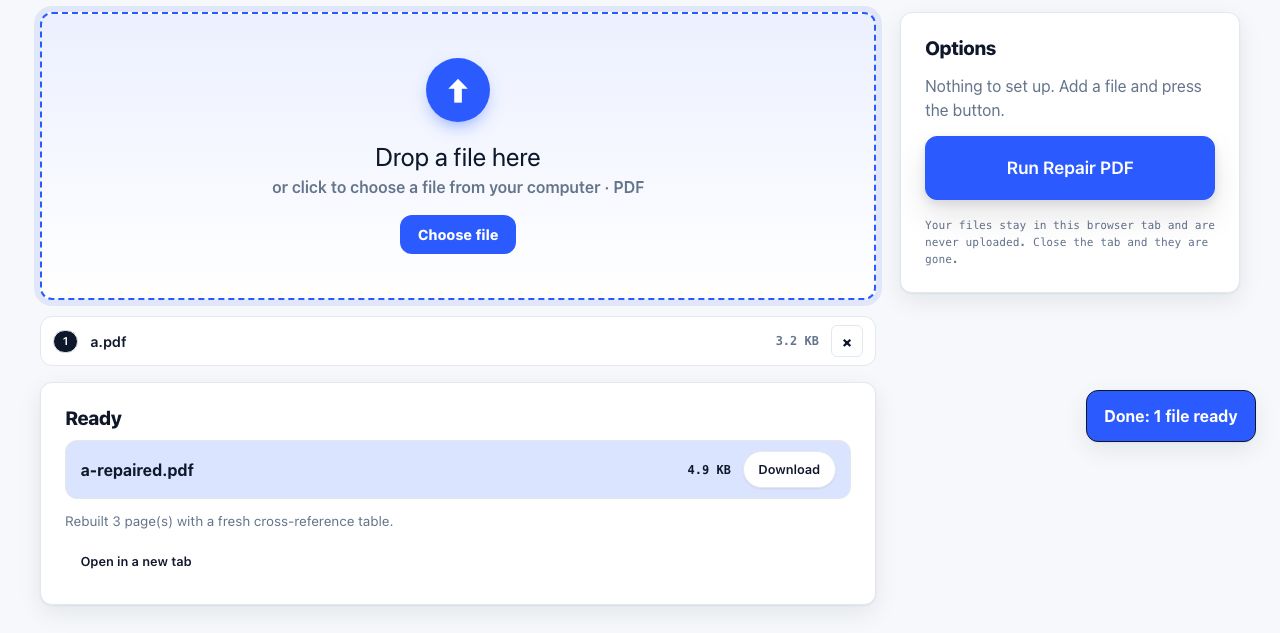
- Open Repair PDF and drop the damaged file. Drag the PDF onto the drop zone or click to browse. There are no options to set: the tool decides what it can recover.
- Click Run Repair PDF. The file is read in a forgiving way in your browser. Broken pieces are skipped rather than stopping the whole job, and the pages that can be read are collected.
- Read the note and download. On success the Ready list says how many pages were rebuilt with a fresh internal index, and
name-repaired.pdfdownloads. If the file is too broken to read at all, you get an error that says so instead of a blank PDF. - Check the pages. Open the result in PDF Reader. If pages are blank or missing, the damage was in the content rather than the structure and this tool cannot restore it; go back to the app or scanner that made the file.
Frequently asked questions
What kinds of damage can Repair PDF fix?
Structural damage: a wrong or missing internal index, a broken footer, a missing end-of-file marker, pieces written in the wrong form, and files a strict PDF app rejects. It cannot restore content that is not there, such as a page cut off part-way, a corrupt picture, or a page lost when the download stopped early.
Why does the repaired file show blank pages?
The structure was rebuilt, but the drawing instructions for those pages, or the fonts and pictures they use, were damaged or missing. A blank page is what remains once unreadable content is skipped. The only real fix is to export the PDF again from the app or scanner that made it.
Will repairing change how the document looks?
No. Page content is written out as it was read, so text, pictures and layout are unchanged. The file may grow slightly because it is saved in a plain, uncompressed layout for compatibility; run Compress PDF on Light afterwards if size matters, which loses no quality.
Can it repair a password-protected PDF?
Only the structure. The password protection is left in place and the page content stays scrambled, so if the password was lost the pages are still unreadable. If you know the password, remove it first with Unlock PDF, then repair the unlocked file.
What if the tool says it could not read the file?
Then not enough of the file survived for a rebuild, which usually means the file is mostly missing or is not actually a PDF, for example a web error page saved with a .pdf name. Try downloading or exporting it again from the original source.
Looking for the long version? The guides cover each of these jobs in depth.
What is PDF/A, and when do you actually need it?
PDF/A is the archival version of PDF: fonts embedded, no scripts, no encryption, no outside references. Who requires it, and why an ordinary PDF can rot.
How to prepare a PDF for long-term archiving
PDF archive checklist: repair files, preserve searchable text, remove metadata if needed, and convert to PDF/A when your records policy requires it.